NO MONTHLY FEES
Bookkeeping spreadsheet
for Australian sole traders and small businesses
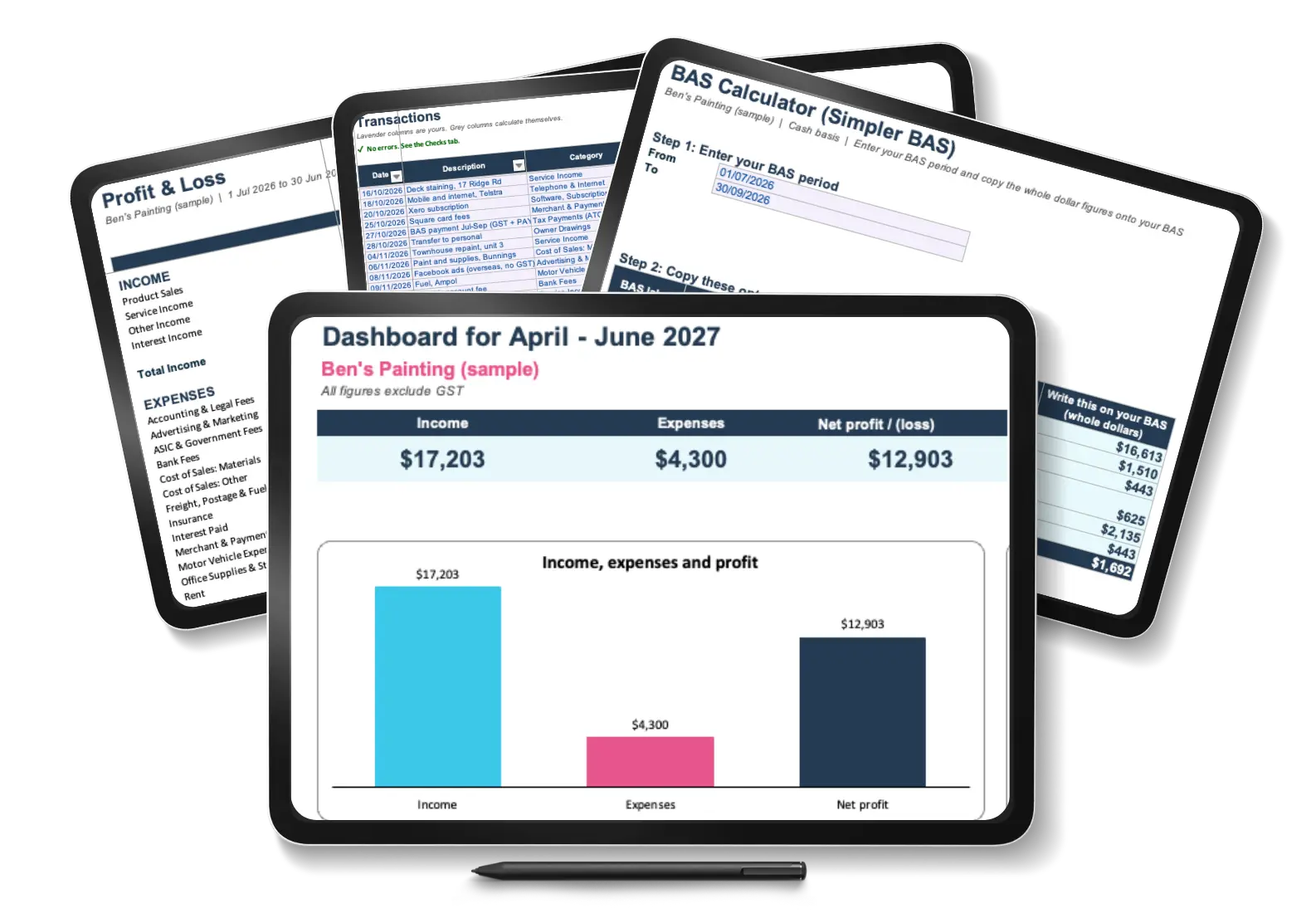
Keep your bookkeeping organised, calculate GST and prepare your BAS figures … without paying for accounting software.
Designed for Australian freelancers, sole traders and small service businesses with straightforward bookkeeping needs.
Record your income and expenses in one place, let the Small Business Bookkeeping Spreadsheet do the calculations, and see where your business stands.
Doing your own bookkeeping?
Your business is going well. You’re good at what you do, your clients pay on time, and you’ve been doing your own bookkeeping from day one. You record your income, keep track of expenses and somehow pull everything together when it’s time to prepare your BAS.
It works … mostly. But every quarter, BAS time comes around and you find yourself scrolling through months of transactions, work out the GST by hand and then check and double-check the figures again … and … again … and … again. And you are wondering whether you’ve missed something.
Sound familiar?
You don’t need fancy accounting software with features you’ll never use. You may just need a better-organised, easy-to-use spreadsheet that does the calculations for you, highlights potential mistakes and gives you useful financial summaries.
That’s exactly why I created this Small Business Bookkeeping Spreadsheet.
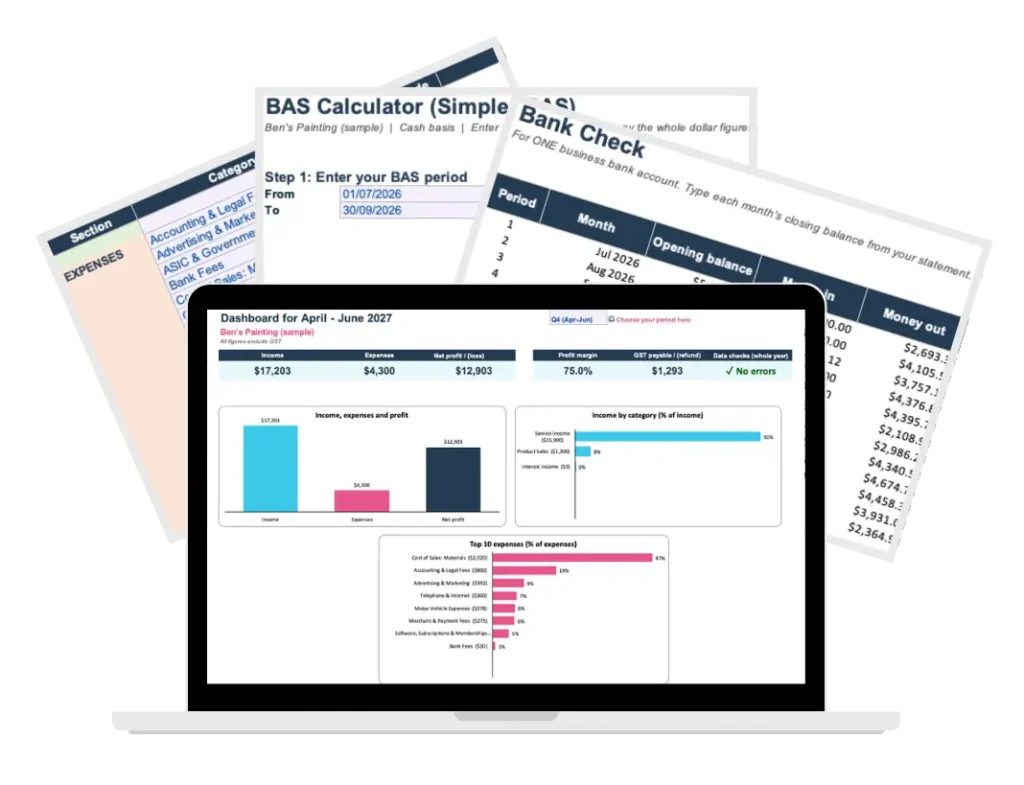
How does the bookkeeping spreadsheet work?
The idea is simple: you record your transactions in one place, and the spreadsheet takes care of the calculations and summaries.
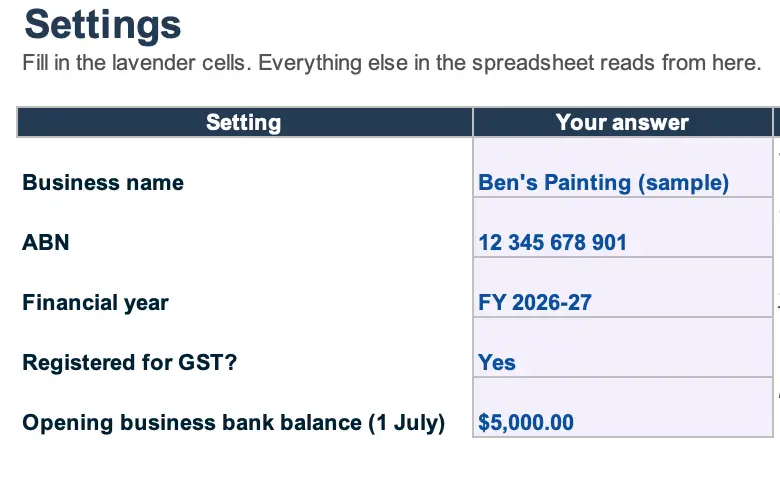
01) Set-up
It takes two minutes and you only need to do it once!
- your business details
- financial year
- GST registration status
- your income and expense categories: review pre-loaded options, rename them or add your own to suit your business.
And you’re done with setup!
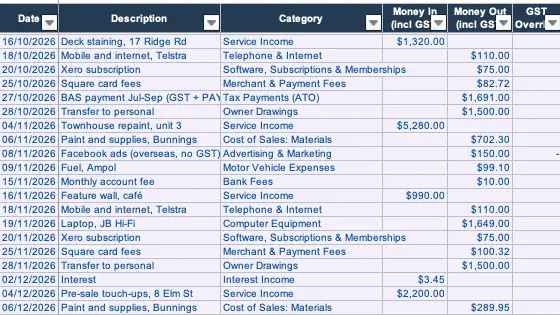
02) Transactions
- enter your transactions: date … description … amount
- select a category from the dropdown
- GST registration status
- override calculated GST if needed
- optionally you can add more details like invoice number and a link to the receipt
And the spreadsheet does the rest.
03) Checks
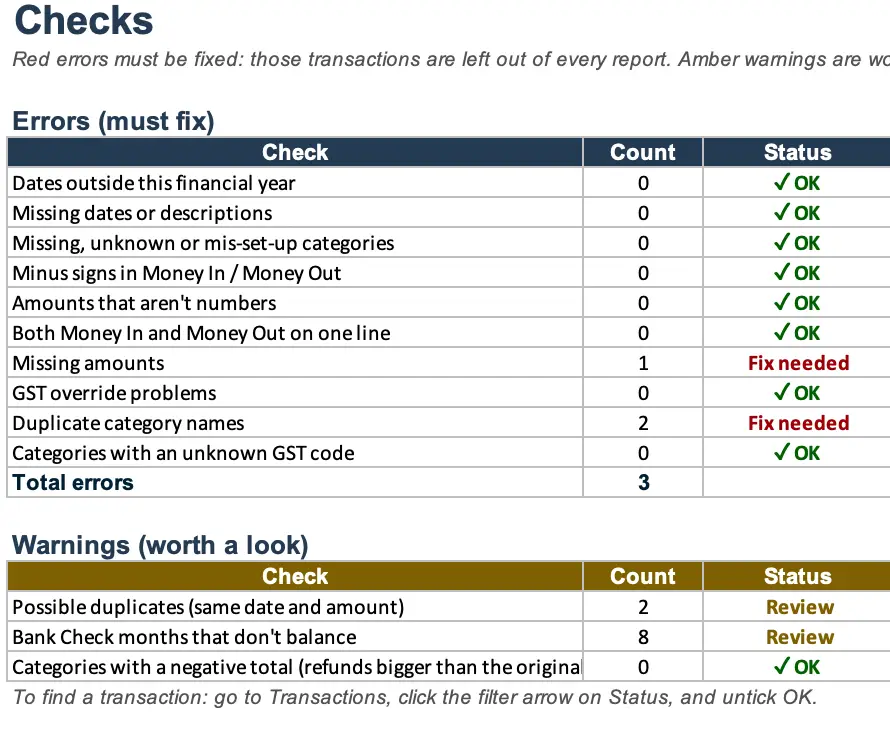
One of the most important features: the built-in checks to flag potential problems.
- possible duplicates
- missing descriptions
- negative amounts
- GST that is too high
- uncategorised transactions
- bank account check each month so you know nothing has slipped through
04) Reports
Once your transactions are in, your reports are showing the actual summaries.
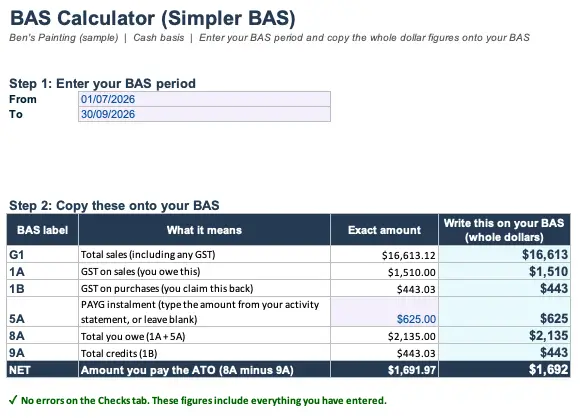
- Simpler BAS figures: total sales, GST on sales and GST on purchases are calculated, plus there’s a spot to add your PAYG Instalments
- BAS Summary report for the financial year
- Dashboard: to show how you’re tracking
- Profit and Loss statement: monthly, quarterly and annual breakdown
- Accountant summary with every category’s totals (a simplified General Legder if you like) that you can send to your accountant at year end
Choose the period you want to review, and your reports will automatically update to show the relevant figures.
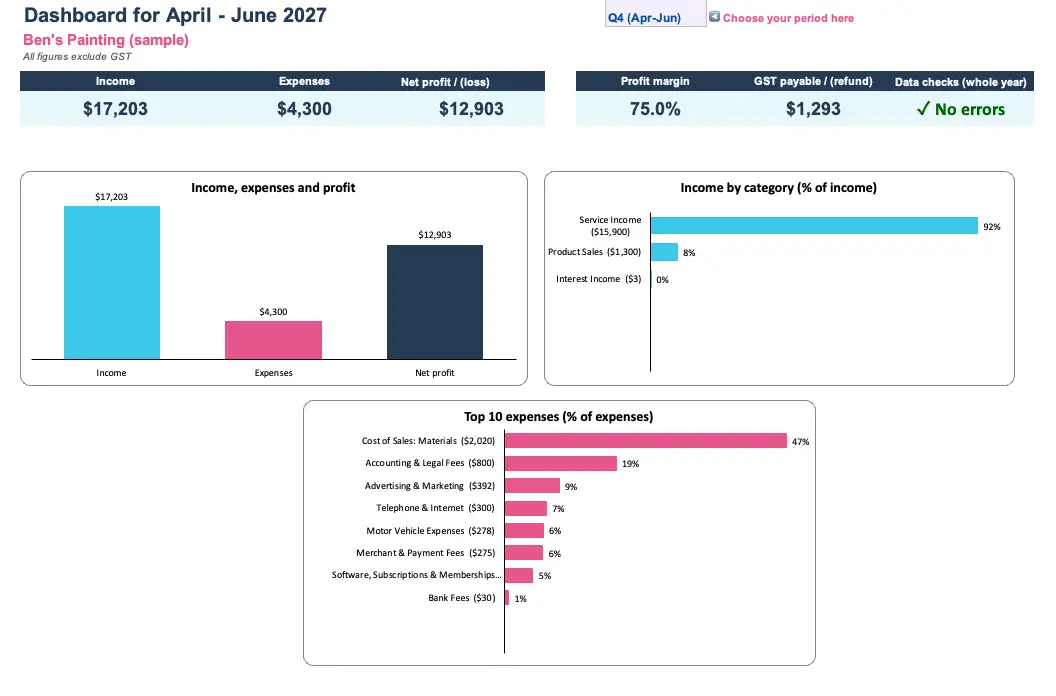
Useful business information, not just a list of transactions.
Is this spreadsheet right for your business?
I want you to buy the right tool, even if the Bookkeeping Spreadsheet for Australian sole traders and small businesses isn’t this the one for you now. So here’s a list that can help you decide.
This bookkeeping spreadsheet is a good fit if you:
- are an Australian freelancer, sole trader or a small service business owner
- have straightforward business transactions
- want to do your own bookkeeping rather than employ a bookkeeper
- are registered for GST on a cash basis or you are not GST registered yet
- prefer using spreadsheet rather than learning the ins and outs of accounting software
- want structure and confidence without a monthly bookkeeping software bill
- are comfortable entering your transactions manually
- want to create a stronger foundation for accurate financial reporting
This bookkeeping spreadsheet is probably not right for your business if you:
- are not registered in Australia
- have employees and need payroll or PAYG withholding
- need inventory management or accounts receivable and payable.
- report GST on an accruals basis
- want your bank transactions to flow in automatically
- have complex accounting transactions
If any of this list sounds like you, accounting software is probably worth the subscription.
And that’s okay. I teach Xero too 😉.
This spreadsheet is designed for simple record-keeping and GST calculations. It isn’t intended to replace a full accounting system for businesses that need one.
What do you get for $27?
Small Business Bookkeeping Spreadsheet
Excel version
A ready-to-use spreadsheet with customisable categories, GST calculations, built-in error checks, financial reports and a dashboard.
Key formulas are protected to reduce the risk of accidental changes.
Google Sheets version
You’ll also receive the Google Sheets version, ready to copy into your own Google Drive if you prefer working online.
Illustrated PDF guide
A step-by-step guide with screenshots showing how to set up your spreadsheet, enter transactions, review GST calculations and use your reports.
Video walkthrough
Sometimes it’s easier to watch someone do it.
I’ll walk you through the spreadsheet and show you how the different worksheets and features work together.
One purchase. No ongoing template subscription fee.
Your licence allows you use the purchased version for one business across multiple financial years. Simply start a new spreadsheet for each year.
Created by a bookkeeper who believes bookkeeping should make sense
Hey there, I’m Kristy! 👋
I’m a bookkeeper and accountant, and I’ve spent more than 20 years working with business finances and helping people understand their numbers.
At Bookkeeping Tutor, my goal is to make bookkeeping practical and understandable without unnecessary jargon or complications.
I teach Xero, and I know accounting software can be incredibly useful. But I also know that not every small business needs the same tools.
If your business has straightforward transactions and you’re comfortable working in Excel or Google Sheets, a well-organised spreadsheet may be all you need for your everyday record-keeping.
That’s the thinking behind this template.
“Finally, bookkeeping that makes sense.”

Frequently asked questions
Do I need advanced Excel skills?
Not at all.
If you’re comfortable opening a spreadsheet, entering information and choosing options from dropdown lists, you should be able to use it. The illustrated PDF guide and video will help you get started.
Can I use this spreadsheet to prepare my BAS?
Yes, provided your business is registered for cash-basis GST reporting and uses Australian Simpler BAS reporting method.
This spreadsheet calculates total sales (G1), GST on sales (1A) and GST on purchases (1B), based on the transactions and GST treatment you enter. You can also manually enter a PAYG instalment amount, if applicable. You are still responsible for checking your figures before lodging.
It doesn’t calculate every possible BAS obligation, such as fuel tax credits, and it doesn’t lodge your BAS.
Does it work with Google Sheets or Excel only?
You’ll receive both versions of the Australian Small Business Bookkeeping Spreadsheet..
You can use the Excel version with a compatible version of Microsoft Excel, including Excel for Mac, or the Google Sheets version in your browser.
Does this spreadsheet work on a Mac?
Yes. Use the Excel version with Microsoft Excel for Mac, or use the Google Sheets version in any browser.
Can I use it if I’m not registered for GST?
Yes. You can select ‘No’ for GST registration in the Settings, and the spreadsheet will not calculate GST. You can still use the straightforward spreadsheet to organise your income and expenses and prepare financial summaries.
Do I need Xero or other accounting software to use this spreadsheet?
Not at all. That’s the whole point of this spreadsheet. If you do not have employees and have straightforward transactions, this spreadsheet may be sufficient for your day-to-day record-keeping. However, it doesn’t include advanced accounting features such as payroll, inventory, invoicing or accounts payable management.
Can I import transactions directly from my bank?
There is no automatic bank feed or built-in bank import function in this version.
You’ll enter your transactions manually from your bank statement or other records, although you are able to copy relevant transaction details from a bank statement into the spreadsheet.
This spreadsheet most suitable for smaller businesses with manageable transaction volumes. The spreadsheet can accomodate up to 3,000 transactions for a financial year, that is (on average) 50 transactions a week.
Can I use it every financial year?
Yes. Your licence allows you to reuse the purchased version for one business across multiple financial years. Just save a fresh copy, select the new financial year in Settings and start recording your transactions. Keep your previous year’s spreadsheet for your records.
I’m halfway through the financial year. Can I start now?
Absolutely. You can start at any time during the financial year.
However, if you want complete BAS and financial year reports, you’ll need to enter the earlier transactions for the relevant periods. For a complete annual financials, I recommend entering your transactions from 1 July of the current financial year.
How will I receive the spreadsheet?
After purchasing, you’ll receive access to the Excel and Google Sheets versions, the illustrated PDF guide and the video walkthrough. You have the option to download them instantly after purchase, but we also send you the links via email.
What if I get stuck?
Start with the PDF guide and the video: both are designed to help you use the spreadsheet confidently.
If you still have a question about using the spreadsheet, you can contact me at support@bookkeepingtutor.com.au.
Support covers using the spreadsheet, rather than individual bookkeeping or tax advice.
Ready to make your bookkeeping a little easier?
You don’t need to make your bookkeeping more complicated than your business requires.
If you want to keep control of your own records or just don’t want another monthly software subscription, the Small Business Bookkeeping Spreadsheet is a practical place to start.
It helps you organise transactions, calculate GST and keep track of your business finances … easy as.
- Straightforward small-business bookkeeping.
- Instant download.
- Excel and Google Sheets versions.
- PDF guide and video walkthrough included.