
Introduction
Choosing a Xero plan sounds simple, but in practice, it can cause confusion: pick the wrong one and you either hit limits you didn’t see coming, or you realise you’re paying for features you don’t even know how to use yet. What I’ve noticed over the years is that people usually make one of two choices. They either go for the cheapest plan and hope for the best, or they choose a higher-tier plan because they don’t want to get it wrong.
So in this post, I want to talk you through how I help my clients choose the right Xero plan for their business, without overthinking it. The decision should be based on how your business actually runs day to day: how many people you pay, how you send invoices, how you record expenses; these details matter far more than the actual plan names.
Please note that this post focuses on the Australian version, current as at December 2025. Plans and names can vary by country and change over time, but the way you think through the available options stays the same.
Overview of Xero plans in Australia
Right now, Xero offers several plans in Australia: Ignite, Grow, Comprehensive, and Ultimate (with 4 alternatives aka with different employee limits like Ultimate 10, 20, 50 and 100).
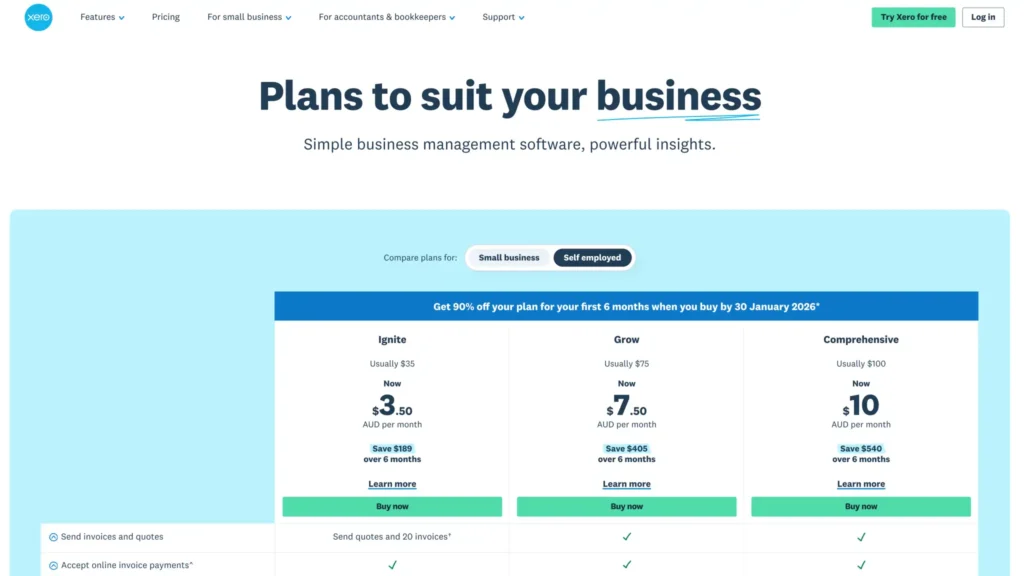
I don’t want you to memorise these. The important part is the pattern behind them.
Lower-tier plans are built for simpler businesses: sole traders, freelancers, or small operations with fairly straightforward bookkeeping. As you move up the plans, they’re designed for businesses with more staff, more transactions, overseas dealings, or more complex reporting needs.
One quick word on pricing. Xero often advertises large discounts for new users, and that can be tempting. Just make sure you take note of the full monthly price as well to avoid any surprises once the discounted period ends.
Questions to ask when choosing a Xero plan
Rather than comparing plans line by line, I ask clients a few practical questions. These questions almost always point us to the right plan without any guesswork.
1) How many employees do you have?
The first thing we look at is payroll. If you have employees or you’re about to hire, you need to know how many people you’ll be running payroll for. That number includes full-time and part-time staff and casuals, you (if you pay yourself a wage), and directors paid through payroll. In some special cases, contractors might be included as well.
Once you know your employee number, some plans are immediately ruled out.
2) Do you use foreign currency?
Next, we talk about currency. Do you invoice customers in foreign currencies, or do you have overseas business bank accounts that need to connect to Xero?
Important to note that I’m not talking about subscriptions charged in USD, I mean actually running part of your business in another currency.
If that’s the case, you’ll need one of the higher-tier Xero plans without any questions.
3) How many invoices do you issue in a month?
The third factor is invoicing. Some businesses send a handful of invoices each month to regular clients. Others send invoices daily, or even multiple times a day. And some online businesses don’t really use Xero invoicing at all because their payment platform takes care of it. How you invoice plays a big role in choosing your Xero plan.
4) How many bills do you process through Xero in a month?
And lastly, we look at bills. This is often the most confusing part because in Xero, “bills” means supplier bills entered into the system as such.
If your business is doing accrual accounting, you’ll usually enter more bills and need a higher plan.
If you’re a sole trader or small business using cash accounting, you may mostly code expenses straight from the bank feed and barely touch Bills at all in Xero. In that situation, a lower-tier plan can work perfectly well.
Advanced features
This is where I gently reassure a lot of my clients. Most small businesses don’t need advanced features like project tracking, advanced KPI reporting, or expense claims, especially in the early stages.
When you’re starting out, the real goal is to understand your numbers, keep things tidy, and feel confident using Xero. As your business grows, your needs become clearer, and upgrading is easy. It’s a bit harder to go the other way if you start too complex.
Takeaway
Choosing the right Xero plan isn’t about picking the cheapest or the fanciest option. It’s about choosing the plan that aligns with your current business operation. And remember: you can always upgrade later.
If you’re unsure, just take your time and think about payroll, currency, invoicing, and how you record expenses. Those four areas will guide you far more reliably than any feature list.
Download my decision chart (no opt-in required) that will help you choose the right fit more easily.
I believe in You: you’re a champion 🏆

PS: If you’d like to learn more about Xero’s functions, please check out the other blog posts by 👉 CLICKING HERE.
PS: If you prefer it in a video format:



Pingback: What to Prepare Before Setting Up Xero for Your Business | Bookkeeping Tutor